
How it works
Everything PlanSports does.
Step by step.
For every feature: who it is for, how to start on the website and in the app, real-life examples and what happens behind the scenes. Plus what does not work yet.
Jump to
Training
Training that knows what you did yesterday.
Pick your sport and what you are working on today. PlanSports gives you the warm-up, today’s plan and your last weight for every exercise. Finish with cardio or stretching, then see your summary.
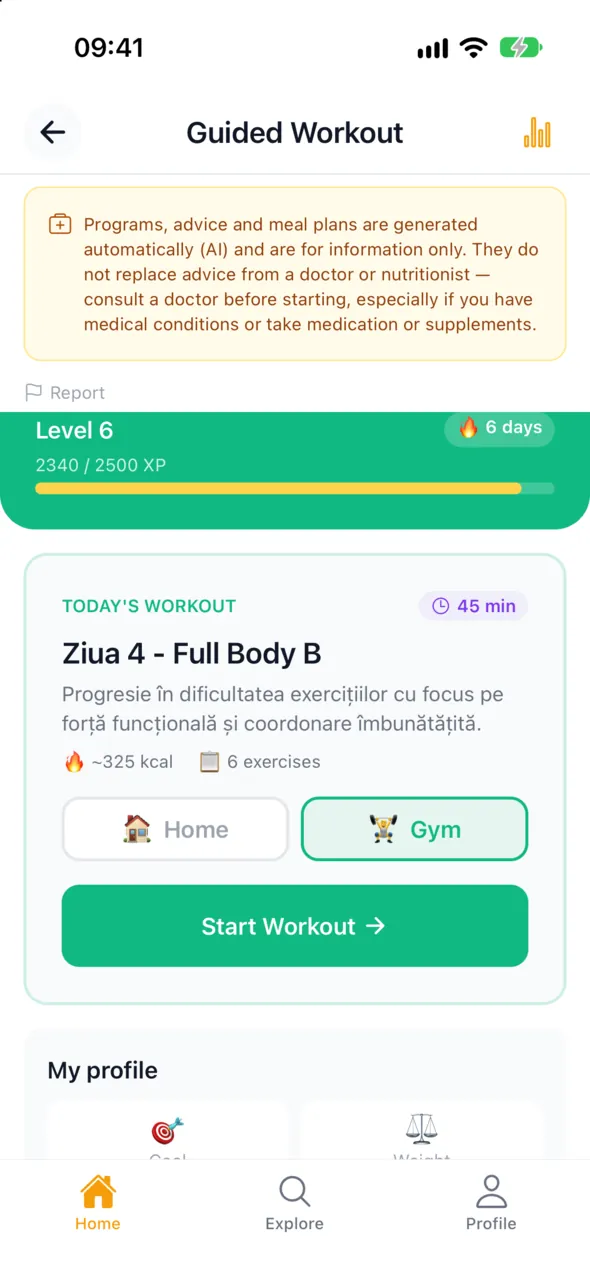
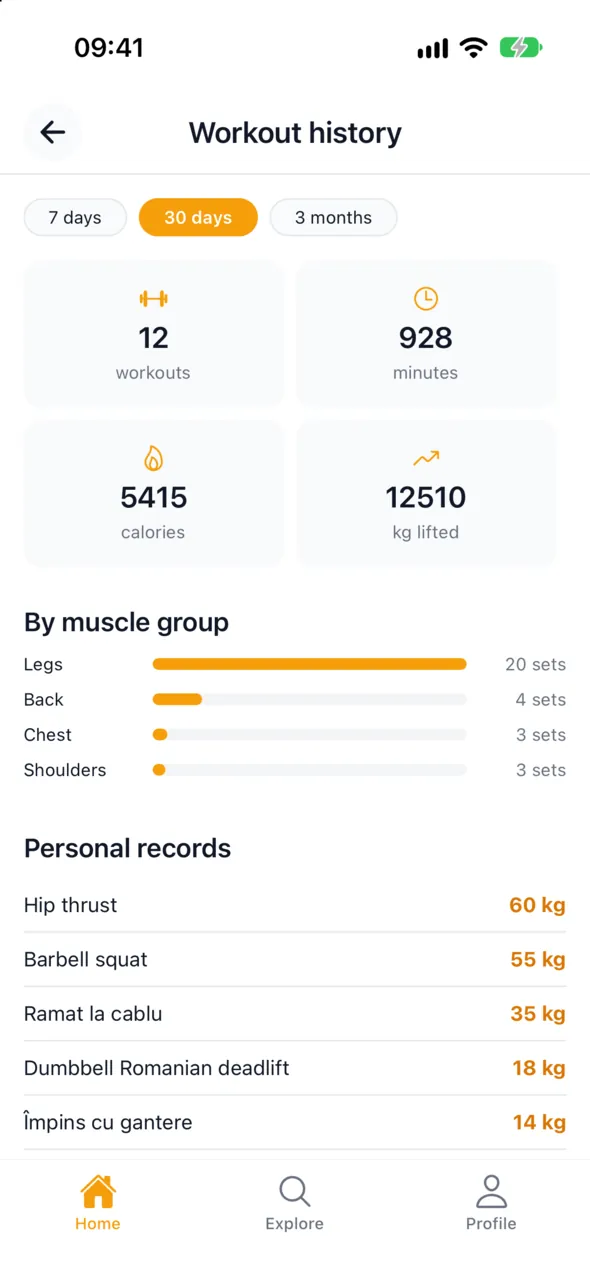
Guided workout
17 sports: aerobics, badminton, basketball, boxing, CrossFit, football, futsal, handball, judo, karate, padel, squash, table tennis, taekwondo, tennis, volleyball and yoga. The gym has 132 exercises, each with an anatomy drawing, steps, common mistakes and alternatives.
4-week AI programme
Answer a short questionnaire and get a 4-week programme, plus nutrition, water and weight tracking. Exercises for injured areas are left out.
“Want a coach?”
During your workout you see how many coaches are online. Call one and they see your sets live, message you and can log for you. Free for now.
Apple Watch New
Live heart rate and calories, sets and techniques ticked off on your wrist, the guided plan on the watch. Coach messages vibrate on the watch.
Health data
Heart rate from the watch and the medical sheet come in only with your explicit consent and are encrypted. Your coach sees heart rate only if you allow it and never sees the medical sheet.
On the website
- Open the
Workoutsmenu and tapNew workout. - Choose the sport, then the type: strength, technique or cardio.
- At “What are you working on today?” tap the muscles on the body or the technique zones on the court.
- Say where you train: gym, home with dumbbells or no equipment.
- Follow the warm-up and the plan, log sets (reps × kg) or successful attempts.
- Finish with cardio or stretching if you like, and see the summary: calories, XP and day streak.
In the app
- From
HometapWorkout. The steps are the same as on the website. - It works offline and syncs when you are back online.
- Start on your phone and continue on another device. One workout is open at a time.
- For the AI programme:
Guided workout→ questionnaire → your 4-week programme. - For a coach: the line “Want a coach? ● N online now” →
Call now.
Example
Ana, 24, at the gym
She picks “Chest + triceps” and “gym”. On the bench press she sees “Last time: 4×8 at 40 kg” and tries 42.5. She ticks sets off on her watch, and her coach, called in from the app, adds a set remotely.
Example
Radu, tennis
He logs a topspin forehand drill: 30 attempts, 22 successful. A month later he sees how his accuracy has improved.
Behind the scenes
- Every workout gets a unique code on the device itself, so the phone, watch and website never duplicate it.
- Calories are calculated from the intensity of the effort and your weight.
- The AI programme is written by an artificial intelligence model from your answers; it can be regenerated once every 7 days.
- The exercise catalogue is updated from the admin panel and reaches the website, phone and watch without a new app version.
Limits and what’s next
- The Apple Watch app is on the App Store, included with the iPhone app, and gets regular updates.
- Wear OS watches and Health Connect on Android are not available yet.
- Sport guides are on the website only for now.
- The live coach is free for now; paid online sessions will come later.
Arena
A champion’s mind
trains every day.
Every day, the same challenge for everyone: a warm-up and three short rounds. About three minutes. Being right comes first, then being fast.
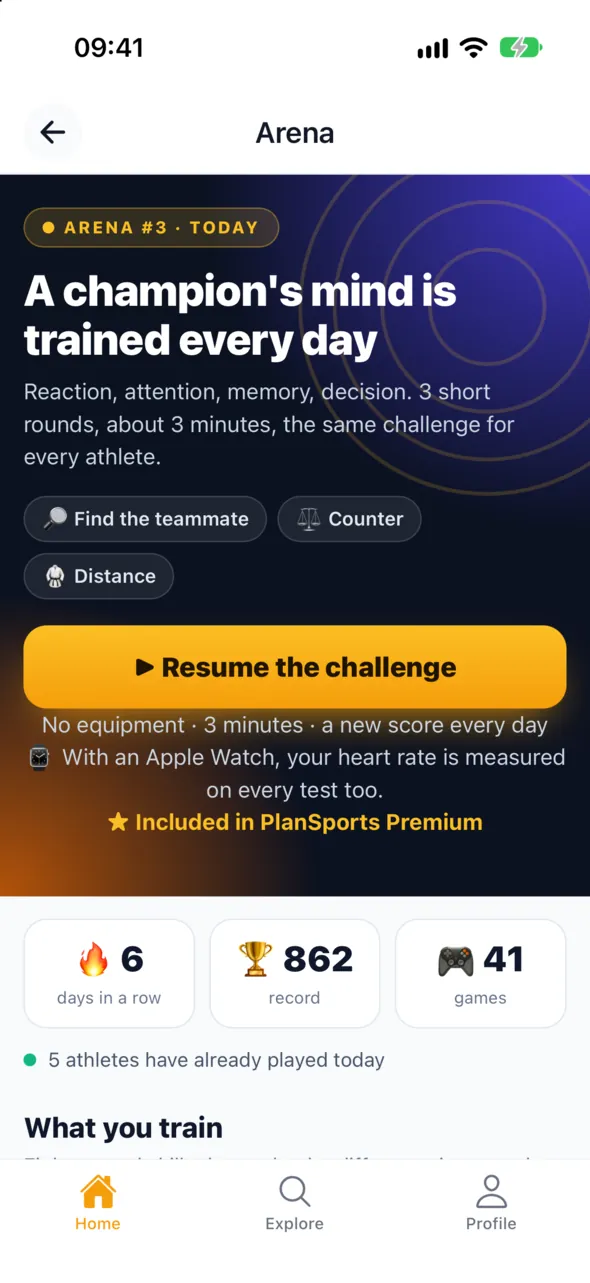
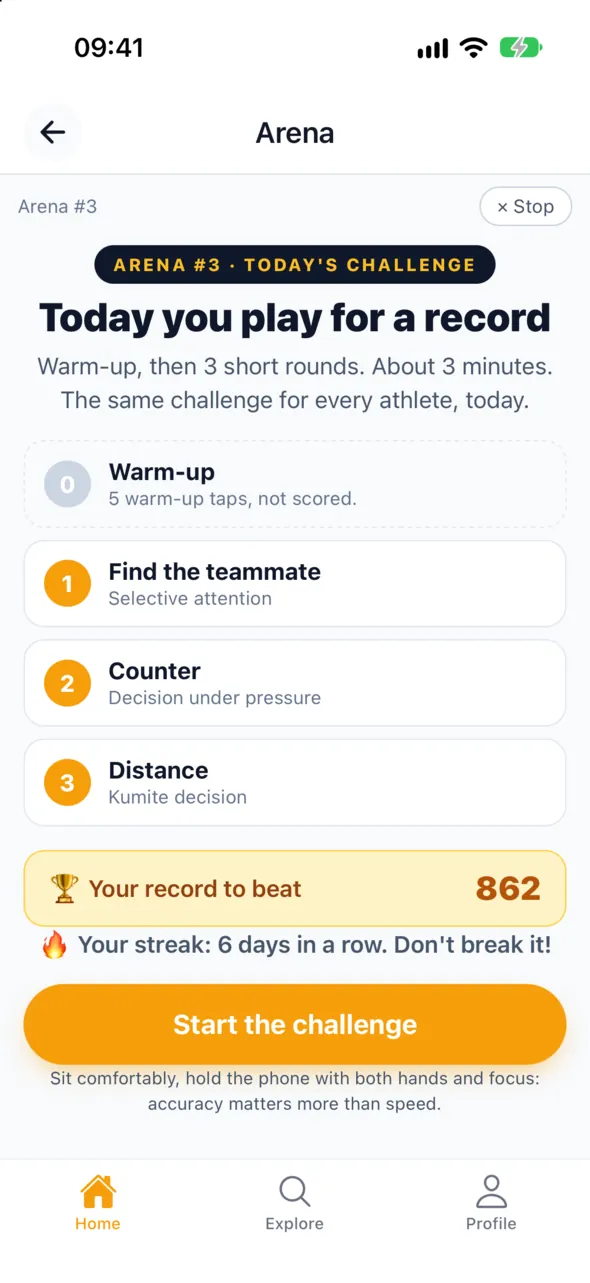
Eight games
“The Start” (reaction), “Three Gates” (choice), “The Referee” (stopping in time), “Find Your Teammate” (search), “The Playbook” (memory), “Flash” (fast vision), “Trajectory” (anticipation), “Counter” (decisions under pressure).
Made for your sport
Karate kumite: anticipate the attack, feint or attack, distance. Kata: the order of moves. Tennis: the serve and the rally. Football: pass direction, scanning, choosing, holding back a shot.
Assessment and programmes
A standard assessment at the start and then periodically, a 3-minute mini-test before or after training, an 8-dimension profile and 4- or 8-week programmes with 3 sessions a week.
Coach dashboard
The Arena tab in “My athletes”, an automatic report every Monday and a Teams page: how in sync athletes react, in pairs.
On the website
- Sign in and open
/arena. - Tap
Play the challengeand follow the warm-up. - Play the three rounds and get a score from 0 to 1000.
- Share your score card; whoever opens it can play too, with your referral link.
- Coaches open
My athletes→ Arena tab, or/coach/arena.
In the app
- On iPhone:
Home→ theArenacard → play today’s challenge. - See your day streak, your record and the club ranking, if you choose to appear in it.
- Choose your sport, the assessment, a programme or the mini-test from the same screen.
- In the iPhone and Android apps, Arena is available from version 1.0.2.
Example
Ana, 14, karate
She plays every evening. The first two rounds are general, the third is “Feint or attack”. After three weeks she has an 18-day streak, and her coach sees in Monday’s report that she is falling for feints less often.
Example
A kata team
The coach starts a synchronised session with five athletes, each on their own phone. They get the pairs who react most alike and a suggested trio, to be checked on the tatami.
Behind the scenes
- The daily challenge is built the same way for everyone from the date, so everybody plays exactly the same rounds.
- The score: 700 points for accuracy and 300 for speed, weighted by accuracy. Tapping at random earns nothing.
- The server recalculates the score from every tap; if you change device, the result is marked as not comparable.
Limits and what’s next
- Arena is included in PlanSports Premium. Without a subscription you can see the daily challenge, the leaderboard and your history, but playing, practice, the assessment, the programmes, team synchronisation and the coach panel need the subscription.
- Arena does not measure intelligence and does not make medical diagnoses. It does not decide team selection.
- There is no global ranking; there is a club ranking, for those who opt in.
- In the app, Arena is available from version 1.0.2 (iPhone and Android). The game texts are in Romanian, English and French.
- For kata, only Heian Shodan is fully verified for now.
Forma
Every rep counted.
And checked.
Put the phone down, step into the frame and start. The camera counts your reps and checks range of motion, tempo and body position. Half reps don’t count.
Seven exercises
Push-ups, pull-ups, squats, sit-ups, lunges, jumping jacks and plank. Each has its own rules: for example, push-ups with knees on the floor or an arched back don’t count.
The automatic referee
The phone sends only movement values, no images. The server recounts the set and checks that the movement is human; a fabricated set scores 0.
Points, levels and leaderboards
Points for every verified rep, 10 levels per exercise, XP across your account. Overall, per-exercise and club leaderboards, by week, month or all time.
Certified records
Film the set, post the clip and someone from PlanSports checks it. A certified record gets the ✓ badge and double points.
Clubs and quests
Create a club and invite colleagues with a link. Exercises unlock in the club at 5, 10, 20, 30 and 50 members; there are also daily and weekly quests and a monthly season.
Contests New
The Forma Cup between companies, in a single day, and the Gym Battle, monthly, between gyms. Free entry, live leaderboard and diplomas.
On the website
- Open
/formato see the exercises, scoring and contests. - Sign in, tap
Start Formaand pick an exercise. - Place the phone or laptop as the page shows (for push-ups on the floor, to the side, about one metre away).
- When the skeleton on screen turns green you hear “Start”; a voice tells you what to fix.
- At the end you see verified reps, points and your rank, and you can share the result card.
- Push-up and squat tests also work without an account, right in the browser.
In the app
- From
Hometap theFormacard and pick an exercise. - Same steps as on the site: phone down, starting position, “Start”, then the set.
- The clip stays on your phone; you post it only if you want your record certified.
- With an Apple Watch, your heart rate during the set appears in your history.
Example
Mihai, push-ups at home
He does 30 push-ups, but 4 have an arched back and the voice says “keep your body straight”. 26 count, he moves up a level and sends the card to a friend who tries to beat him.
Example
A company in Iași
It enters the Forma Cup. Colleagues do squats and sit-ups on their phones, wherever they are, in a single day; the best 5 in the company count.
Behind the scenes
- Movement recognition runs on the phone; the image never leaves the device.
- The server recounts every set with the same algorithm and checks rhythm, natural tremor and body position.
- The rules come from real cheating attempts seen in the data: “cobra” push-ups, bounces instead of squats, pull-ups with a moving phone.
Limits and what’s next
- Forma is included in the PlanSports subscription; Forma contests are free.
- Push-ups are not counted with the phone in front of you: the camera must see your body from the side.
- Karate techniques recognised by the camera are in testing: one point per identification, no XP and no leaderboard.
Coaches and athletes
The right coach.
And their tools.
Athletes find coaches by sport, city and rating and book sessions. Coaches keep their schedule, rates and athletes in one dashboard. PlanSports takes no commission.


Find and book
The coach list shows the nearest first, with a map and filters. Choose the date, time, length (60, 90 or 120 minutes), session type and place: at the club, at your place or online.
Coach profile
Schedule, rates (with club member discounts, packages, group sessions), gallery and reviews on five criteria.
My athletes
Coaches start a workout for one or more athletes, live or logged afterwards, and see every set. They rate athletes from 1 to 10 on the sport’s criteria and build teams with positions and formation.
Scheduled workouts App only
The coach picks the day (within the next 14 days), the time and the full plan. The athlete gets a notification straight away and a reminder before.
On the website
- Open
Coaches(/coaches), filter by sport and city, or tapNear me. - On the profile tap
Book a sessionand choose date, time, length and place. - The coach confirms; after the session you leave a review.
- As a coach: join a club (or create one), then create your profile and set
ScheduleandRates. - Everything is managed in the coach dashboard (
/coach/dashboard).
In the app
- Athletes:
Coaches→ profile → free slot → send the request. - Coaches:
My athletes→ start, schedule, history or invite students. - When scheduling: day, time, sport, muscles, place, message and exercise plan.
- The athlete sees the “Scheduled by your coach” card and taps start.
Example
Mihai, tennis coach
He sets his weekday hours, 150 lei an hour and 10% off for club members. A client books Thursday at 18:00, Mihai confirms, and payment is made directly, on court.
Example
A fitness coach
Schedules “Muscle gain · Chest” for Thursday at 18:00, with six exercises. The athlete gets the notification, swaps two exercises and starts the workout with the watch on.
Behind the scenes
- A booking reaches the coach as a request and becomes firm only after confirmation.
- The session is paid directly between athlete and coach; PlanSports takes no commission.
- The coach–athlete link comes from bookings or from the club and gives access to workouts, assessments, Arena and scheduling.
- Athletes can turn off a coach’s access to their workouts at any time.
Limits and what’s next
- Paying a coach by card on the website is not available; you pay the coach directly.
- Bookings are managed on the website for now; in the app coaches can see them but not confirm them.
- Scheduled workouts are in the app only, in Romanian, English and French.
Clubs
Your club,
in order.
A club has an owner and members with roles: admin, coach, athlete or staff. Every athlete has their own coach. The same account can have different roles in different clubs.


Members and roles
Invite members by name or email. In the app, tap a member’s role to change it: athlete, coach or staff.
Assigned coach
Choose each athlete’s coach. This powers “My athletes”, assessments, scheduled workouts and Arena.
Join requests
Athletes ask to join from the app; the owner, an admin or a coach approves or declines.
My roles
A card in your profile shows which clubs you belong to and in what role.
On the website
- Open
Clubs(/clubs): map and list, nearest first. - The club page shows sports, address and coaches.
- As an owner: create a club, then invite members and coaches.
In the app
Clubs→ the club →Ask to join.- The owner opens the club dashboard → join requests → approve or decline.
- Tap a member’s role to change it and “Coach: …” to assign their coach.
- In
Profile→My roles, you see all your clubs.
Example
A karate club in Iași
The owner creates the club, invites two coaches and approves 30 athletes’ requests from the phone. Ana, 14, gets sensei Elena as her coach; from now on Elena sees her workouts and Arena results.
Example
One athlete, two clubs
Radu does karate at one club and fitness at another. In “My clubs” he sees both, each with its own coach.
Behind the scenes
- The role and assigned coach are stored for each member of each club, not on the account.
- A club can have several coaches and several admins.
Limits and what’s next
- Join requests and approvals happen in the app for now, not on the website.
- Club notifications appear in the app, but not as push notifications.
- Paid club programmes (monthly fee collected through the app) are in preparation.
Courts
A free court.
Found in seconds.
Athletes see nearby courts, opening hours and prices, and book. Owners manage their venues in a simple dashboard. Payment is made at the venue.


Booking
Choose the sport and city or tap “Near me”, see the courts, free times and price, then book. Confirmation and cancellation also arrive on WhatsApp.
Owner dashboard
Four steps with a progress bar: Details → Courts → Schedule → Prices. Then see bookings and revenue.
Flexible pricing
Rates by time of day (for example 80 lei, 100 after 18:00), a “Special day” with different hours and “Duplicate” to copy a court with its schedule and prices.
Phone bookings
Bookings you take by phone go into the same calendar, so nothing overlaps.
On the website
- Open
Book a court(/booking), choose sport and city or tapNear me. - Open the venue, choose the court, the day and a free time.
- Confirm the booking; you pay at the venue.
- Owners:
/pentru-terenuri→ list your venue → code by email → the PlanSports team approves the account. - In the
/ownerdashboard follow the four steps and you are ready for bookings.
In the app
Explore→ courts → venue → free time → book.- Your bookings are in
My bookings, where you can also cancel them. - Owner accounts are created on the website only.
Example
A padel venue in Iași
The owner adds three courts: fills in one and duplicates the other two. Sets 80 lei an hour by day and 100 in the evening. In the first week bookings come in for 19:00, all visible in the dashboard.
Example
Four friends
They want to play on Thursday evening. One taps “Near me”, finds a free court at 19:00 two kilometres away, books and sends the link on WhatsApp.
Behind the scenes
- Free times are calculated from the court schedule, special days and existing bookings, including phone bookings.
- Your location is used only to sort results, rounded to about a kilometre, and is not saved.
Limits and what’s next
- The owner account is separate from the athlete account and is created on the website only.
- Payment is made at the venue; PlanSports does not collect money for bookings.
Competitions
From sign-up
to diploma.
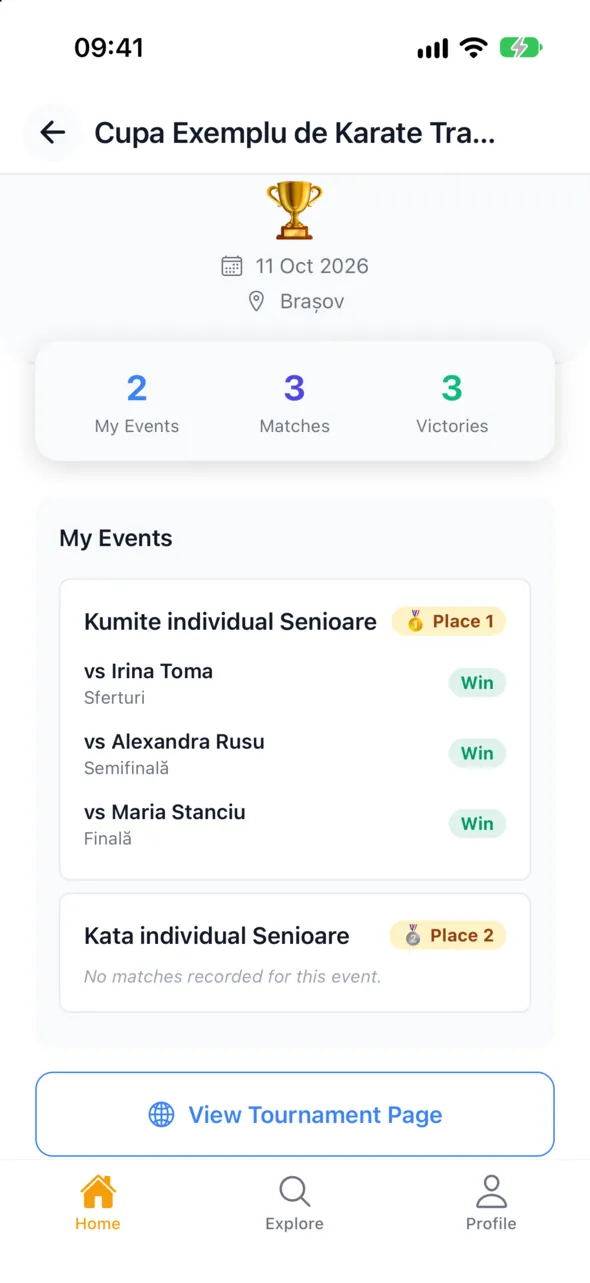
Organisers create the competition, take entries, make the draws and schedule, record scores and show the podium. Athletes sign up and download their diplomas.
Tournaments
For any sport, from tennis and football to judo, boxing and CrossFit: events by category, individual or team entries, draws (single elimination, groups), automatic court scheduling, scores by the sport’s rules and podium.
Karate competition day
Tatami control, kata flags, WKF kumite scoring, scores for enbu and team kata. Screens for the audience: live, tatami, podiums and club ranking.
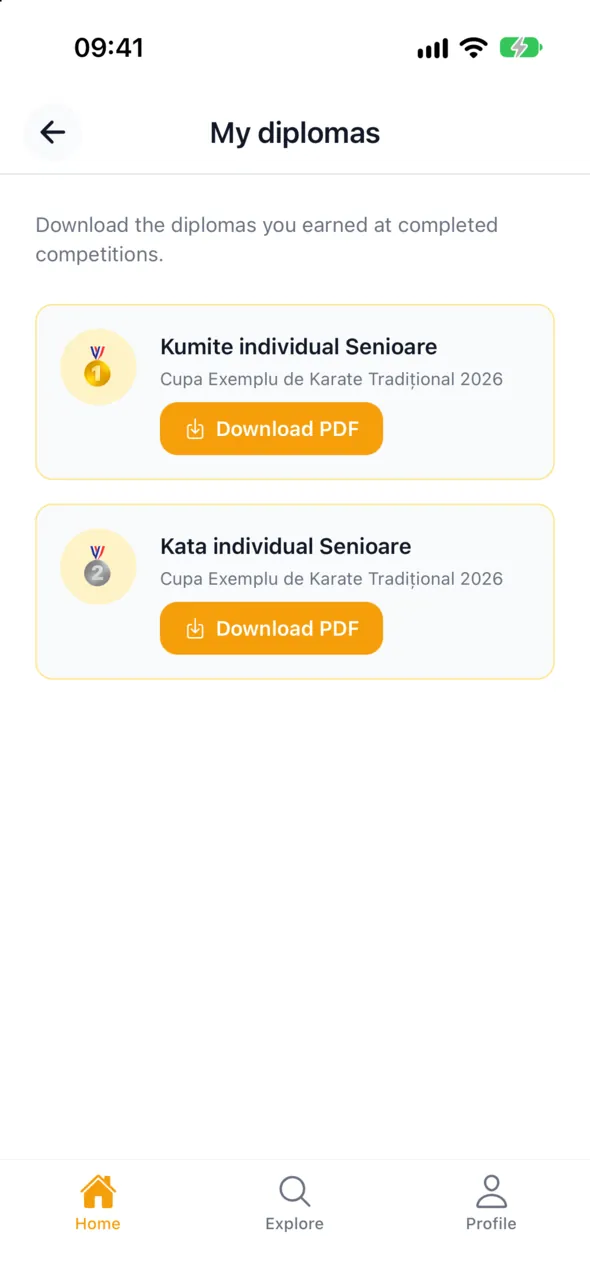
Diplomas
A visual diploma editor, batch generation on A4, with a background or text only for pre-printed paper.
Federations
The federation page shows athlete and club rankings from podiums, filtered by discipline, age, belt and gender.
On the website
- Athletes:
Competitions(/tournaments) → the competition → enter an event. - Organisers: a separate account (
/pentru-organizatori), approved by the PlanSports team. - In the
/organizerdashboard create the competition, events and fee, then open entries. - Generate the draws and schedule, and record results on competition day.
- At the end: podium, diplomas and rankings.
In the app
- See competitions and sign up from
Tournaments. - Your diplomas are in your account, ready to download.
- Competitions are managed on the website.
Example
The Iași final
The National Traditional Karate Championship Final for Children, 19–21 June 2026, ran on PlanSports: tatami, draws, audience screens, podiums and a diploma for every medallist.
Example
A club tennis tournament
The organiser creates two events, receives 24 entries and generates the draw. Court scheduling is automatic and players see their match time in their account.
Behind the scenes
- The draw is generated from the entry list; the schedule takes courts and breaks between matches into account.
- Federation rankings are calculated from the podiums of affiliated competitions.
Limits and what’s next
- Paying the entry fee online is not available for now; the fee is paid on site.
- Teams (football, volleyball, doubles …) can only sign up on the website for now, not from the app.
- Scoring is done by the organiser and by the referees assigned to an event or tatami.
- Karate competition day and diplomas are managed on the website only.
Matches and rankings
Play. Climb.
Collect badges.
Set up a friendly match, invite your friends and record the score. Every match counts towards your level in that sport, the rankings and your badges.


Friendly matches
Sport, date, team size, place and who can see it. Invite friends by email or WhatsApp, even if they have no account.
Level and ranking
For each sport you have a level, experience points, win rate and streak. You see the ranking in your account.
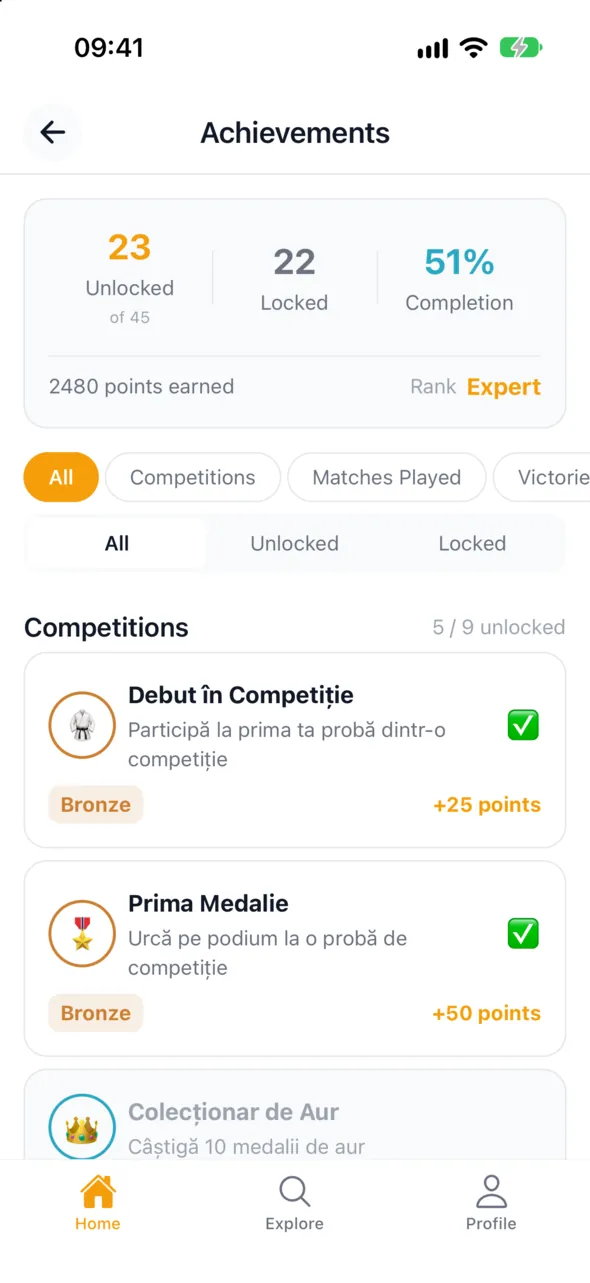
Badges
45 badges across five tiers, including competition medals. Workouts earn XP too.
On the website
- Open
Friendly matchesin your account and create a match. - Fill in the sport, date, place and team size, then invite players.
- Players join team A or B.
- The creator starts the match, enters the score and closes it; the match also gets a public page.
In the app
- Rankings and badges are in your profile.
- For friendly matches, use the website for now.
Example
Thursday night football
Vlad sets up a 5-a-side match and invites eight friends on WhatsApp, two of them without an account. After the game he enters 7–5, everyone gets XP and the match goes into their history.
Behind the scenes
- Results of finished matches update your level in that sport, your streak and the ranking.
Limits and what’s next
- Friendly matches work well on the website; in the app their screens are being fixed.
- A few badges cannot be unlocked yet, and badge names are in Romanian for now.
Artificial intelligence
A coach
who listens.
PlanSports uses an artificial intelligence model where it genuinely helps: your training programme, your nutrition plan and answers about your sport.

Programme and nutrition
A 4-week programme built from your goal, level, free days, equipment and injuries, plus a nutrition plan. A new programme can be generated once every 7 days.
Virtual coaches Website only
A virtual coach for each of 20 sports, with five session types. Ask one question to start, then one a week.
On the website
- AI programme:
/antrenament/evaluare→ questionnaire → wait a few seconds → your programme. - Progress and nutrition are at
/antrenament/progresand/antrenament/nutritie. - Virtual coach:
/antrenor-virtual→ choose the sport → ask your question.
In the app
Guided workout→ questionnaire → your programme, day by day.- Virtual coaches are on the website for now.
Example
Ioana wants to run 10 km
She has three days a week and only dumbbells at home. She gets two running days and one strength day that build up over four weeks, plus a meal plan.
Behind the scenes
- Exercises come from the PlanSports catalogue, they are not invented; injured areas from your profile are excluded.
- You can report generated content if it seems wrong.
Limits and what’s next
- AI does not replace a doctor or a coach. For health problems, ask a specialist.
- Virtual coaches allow one question a week and are on the website only for now.
Subscription
One subscription.
Everything included.
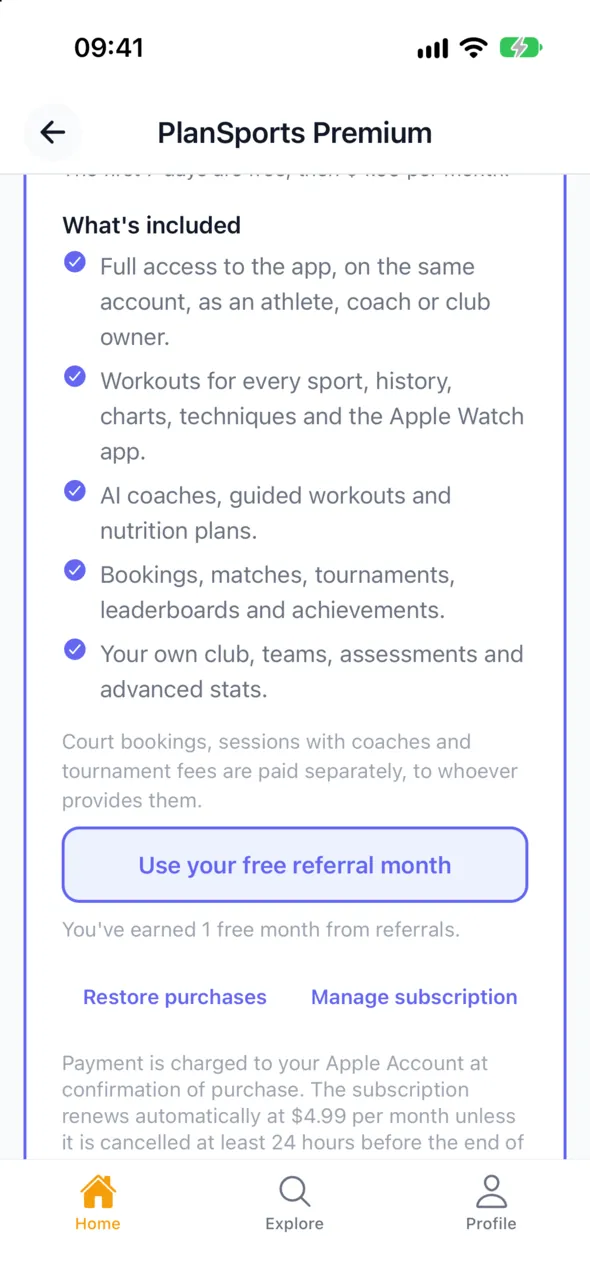
29 lei a month, just one per account. If you are an athlete, a coach and also run a club, you pay once.
7 days free
New account? Try everything for 7 days, at no cost.
What’s included
Guided workouts, the AI programme, virtual coaches, Arena, bookings, clubs, competitions and matches, on the website, phone and watch.
Where you pay
On iPhone through the App Store, on Android through Google Play, on the website by card. Pay once and you have access everywhere.
Paid separately
Coaching sessions, courts and entry fees. Venue owners and organisers have a separate account, on the website.
On the website
- Open
/abonament. - Tap the subscribe button and pay by card.
- You can also see your subscription status at
/abonament.
In the app
- From the subscription screen, subscribe through the App Store or Google Play.
- If you already paid on another device, tap
Restore purchases. - Cancel from the store settings (App Store or Google Play).
Example
Elena, coach and club owner
She subscribes once, from her iPhone. With the same account she trains, follows her athletes, runs the club and also uses the website.
Behind the scenes
- The subscription belongs to the account, not the device. Wherever you paid, the PlanSports server knows you have access.
- Without a subscription the account stays active but limited: you can see everything, and premium actions ask you to subscribe.
Limits and what’s next
- The subscription renews monthly until you cancel it.
- Promo codes are no longer used; the only extra free month comes from referrals.
Referrals
Bring a friend.
Get a free month.
You have a personal code and a link that never expires. For every friend who pays for their first subscription, you get a free month.
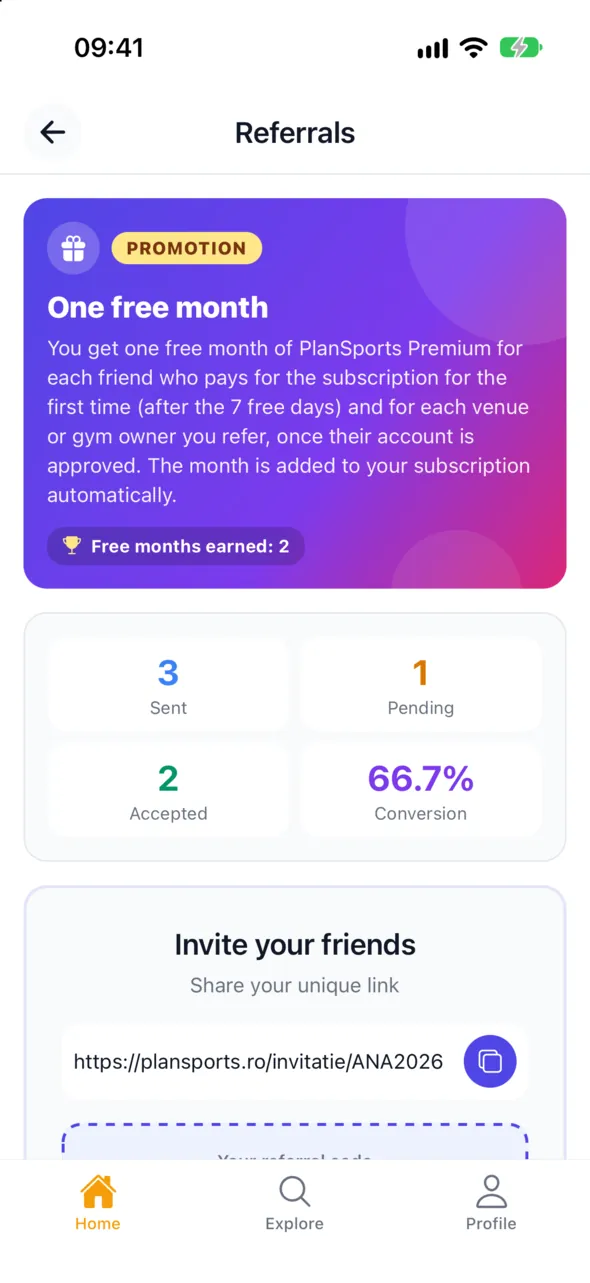
Your link
It looks like plansports.ro/invitatie/ALEX2847. You find it in your account, on the subscription page, in your profile and in the app.
When you get the month
When your friend pays for the first time, not during the trial. For referred venue owners, when their account is approved.
How it is applied
By card and on Google Play, your next payment moves back a month automatically. On iPhone, you redeem the referral offer in the app.
On the website
- Open
Referralsin your account (/dashboard/referrals). - Copy the link or send it straight to WhatsApp, Facebook or email.
- See who signed up through you and how many months you have earned.
In the app
Profile→Referrals→ share the link.- On iPhone, you redeem the month from the subscription screen.
Example
Alex and his team
Alex sends the link to his team chat. Three teammates create accounts and two pay for the subscription after the trial. Alex gets two free months.
Behind the scenes
- The link puts your code on your friend’s account when they sign up. The month is granted once per friend.
Limits and what’s next
- The invited friend gets the usual trial, with no extra bonus.
- For now the link opens in the browser, not directly in the app.
The app and the website
One account.
On any screen.
The website, the iPhone app and the Android app share the same account and the same data. What you start on your phone you continue on the website.
iPhone and Android
The PlanSports app is on the App Store and Google Play, and the Apple Watch app comes together with the iPhone app.
27 languages
The website and the app are translated into 27 languages. Everything is complete in Romanian, English and French; in the other languages, a few new texts appear in English.
Invitations
Invite athletes, coaches, owners or friends by WhatsApp or email. An invitation is valid for 30 days.
Notifications
In the app, by email and on WhatsApp: bookings, competitions, workouts with your coach and scheduled workouts.
On the website
- Change the language from the selector in the header.
- Invitations: the
Invitemenu (/invitatii). - For the app:
/aplicatieor scan the QR code.
In the app
- Choose your language the first time you open it.
- Sign in with the same account as on the website: email, Google, Apple or Facebook.
- Grant permissions (location, notifications, health) only if you want.
Example
A family in Lyon
The parents use the website in French and the child uses the app in Romanian. The club coach sees the same workouts whatever the language.
Behind the scenes
- All devices talk to the same server, so your data is the same everywhere.
- With no signal, workouts are saved on the phone and sent later.
Limits and what’s next
- Some new features arrive on iPhone first, then on Android.
- Wear OS watches are not available yet.
Ready to start?
Create your account in two minutes. You have 7 days to try everything.